IPSec with Azure Gateway
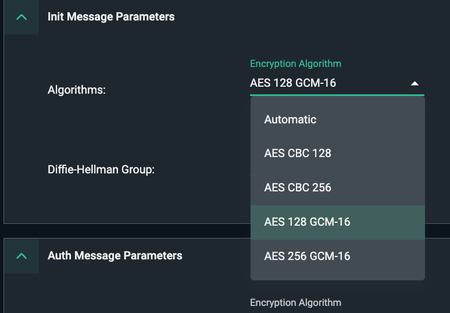
Issue:Intermittent IPSec disconnects; Packet loss; TLSi disabled. Symptoms: Timeline shows 'unable to decrypt' packets intermittently CMA events show TLS Inspection disabled subsequently Session with a server / host behind IPSec Azure gateway lost. IPSec Timeline shows following in the logs Unable to decrypt packet - ignoring Error parsing or unsupported parameters in an incoming packet Environment: IKEv2 tunnel with Azure Gateway GCM algorithm used in the phase1 cipher-suite Rekey / Security association timers are configured such that Azure is the initiator for rekeying. (i.e. Azure timer <= Cato timer). For IKE Phase1 Cato default is 19800 Sec i.e. 5.5 hrs. Azure default is 8 hrs/ The larger picture - While using GCM and IKE timers set to default / matching values [3600sec (p1) and 28800sec (p2)]. This issue is observed whenever the Azure gateway is the initiator of IKE Phase1 tunnel. Cato receives malformed packet from Azure that Cato is unable to decrypt. A corresponding message mentioned above is seen in the IPsec Timeline (Timeline message shown above). Refer to articles below on where to find timelines and pcaps in the CMA. Solution: -Whenever you see similar symptom recommendation is to set P1 lifetime on Cato to default vale of 19800sec (5.5 hrs). This will make it lower than Azure default of 28800 sec (8 hrs) and ensure that Cato is always the initiator of tunnel for P1 rekey. -Another workaround - This issue is specific to GCM based algorithm. Instead of using GCM, use CBC based cipher-suite for IKEv2 Phase I / Init Message Parameters. Cato maintains its own IPSec suite built from scratch based on RFE standards. Cato has been deployed as a gateway peering with many different SDWAN vendors by some of our largest enterprise customers with 100+ sites across the globe. From lab tests by our experts it is confirmed that this behavior is same when Azure IPSec gateway is peering with Juniper SRX or Fortinet as a peer device. i.e the issue is not specific to Cato. Contributors: Special thanks to ngog for this finding bug and reviewing the article for corrections. Reference articles- Did you know? - IPSEC Timelines and PCAP | Cato Connect https://support.catonetworks.com/hc/en-us/articles/4413280512785-Advanced-Configurations-for-a-Site https://support.catonetworks.com/hc/en-us/articles/4413273472145-Configuring-IPsec-IKEv1-Sites https://support.catonetworks.com/hc/en-us/articles/360001688857-Cato-IPsec-Guide-IKEv1-vs-IKEv2 https://support.catonetworks.com/hc/en-us/articles/16203875505565-IPsec-Site-Connectivity-Troubleshooting https://support.catonetworks.com/hc/en-us/articles/11013259398301-Troubleshooting-IPsec-Connectivity297Views3likes1CommentThe power of Smart SASE - Cato Remote Port Forwarding
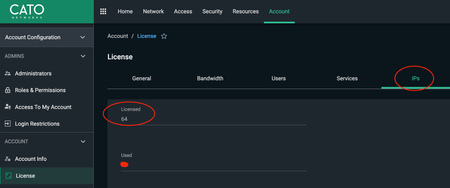
Overview If I interpret the latest comments on SSE Gartner MQ '25, SASE is going to devour the SSE soon. Use case mentioned here is one such instance that SSE alone can't implement without fancy private access or ZTNA or steering hooks. Let alone the publishers that are required to be hosted and maintained by the customers for inbound access. Cato RPF (Remote Port Forwarding) functionality allows you to open up your servers or internal resources to the internet with following quick 3 steps. How? Quick and easy 3 steps: Check how many public IP’s you are licensed for Account > License > IP's Assign an IP from the available Cato Public IP’s for your preferred location Network > Network Configuration > IP Allocation Create RPF rule using the IP you allocated in last step Security> Firewall > Remote Port Forwarding The intrigued users may ask, can I use this for my WAN to WAN traffic? Yes, you can. The documentation does not call it out as an officially supported feature but it works based on my testing. Question before you consider this option: Wouldn't you rather use WAN firewall rules though to control the same though instead of having the internal users to access this resource using public IP? I would leverage WAN firewall and WAN Network rules for the internal traffic crossing sites. Best Practices around RPF Like what uncle Ben or Voltaire would warn, 'with power comes a great responsibility' Note that there are 10K sessions allowed per RPF. If you have a high volume use case use a load balancer behind RPF to front end the servers Tightly control the rule by limiting access to source IP’s. If you see exclamation mark like the one in the first rule in the screenshot, take an action! Host your critical servers behind DDoS/WAF protection if you must allow 0/0. RPF traffic is automatically assigned the lowest priority (P255). For WAN to WAN you can use a special network rule on the source site though (that would work only for WAN to WAN traffic using an Internet Type Network rule with higher priority, P8 for example) References https://support.catonetworks.com/hc/en-us/articles/7784979714333-Configuring-Remote-Port-Forwarding-for-the-Account https://support.catonetworks.com/hc/en-us/articles/360004514358-Security-and-QoS-Recommendations-for-RPF https://support.catonetworks.com/hc/en-us/articles/9299509375517-How-to-Integrate-Third-Party-DDoS-Services-for-Internet-Facing-RPF-Traffic https://support.catonetworks.com/hc/en-us/articles/19516873839005-Integrating-Imperva-Cloud-WAF-DDoS-Services-for-Internet-Facing-RPF-Traffic251Views0likes0CommentsEnhanced Block / Warning Message - Event Reference ID
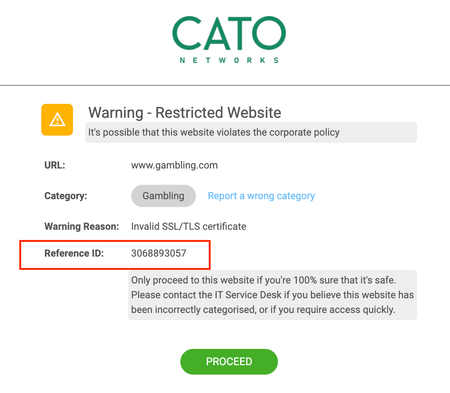
Last week a very powerful troubleshooting and event monitoring feature "Event Reference ID" was introduced. It will make troubleshooting easier for the admins. Now you can customize the block and warning page to display an external event ID that a user will see in the browser. You can use this to further co-relate the event in the CMA using the Event Reference ID https://support.catonetworks.com/hc/en-us/articles/4413280530449-Customizing-the-Warning-Block-Page#heading-3 How to enable this feature? Enable this for Warning and Block page separately. CMA > Administration > Branding > Warning / Block Page How to co-relate using Event Reference ID? -From CMA > Event Monitoring you can use this reference ID to pivot directly to the event240Views1like2Comments