IPSec with Azure Gateway
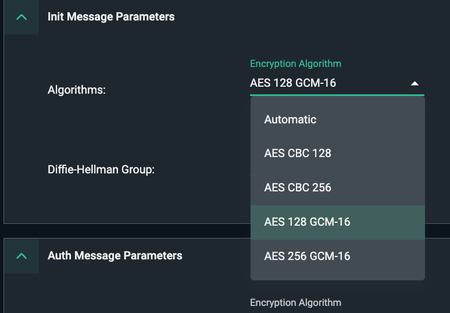
Issue:Intermittent IPSec disconnects; Packet loss; TLSi disabled. Symptoms: Timeline shows 'unable to decrypt' packets intermittently CMA events show TLS Inspection disabled subsequently Session with a server / host behind IPSec Azure gateway lost. IPSec Timeline shows following in the logs Unable to decrypt packet - ignoring Error parsing or unsupported parameters in an incoming packet Environment: IKEv2 tunnel with Azure Gateway GCM algorithm used in the phase1 cipher-suite Rekey / Security association timers are configured such that Azure is the initiator for rekeying. (i.e. Azure timer <= Cato timer). For IKE Phase1 Cato default is 19800 Sec i.e. 5.5 hrs. Azure default is 8 hrs/ The larger picture - While using GCM and IKE timers set to default / matching values [3600sec (p1) and 28800sec (p2)]. This issue is observed whenever the Azure gateway is the initiator of IKE Phase1 tunnel. Cato receives malformed packet from Azure that Cato is unable to decrypt. A corresponding message mentioned above is seen in the IPsec Timeline (Timeline message shown above). Refer to articles below on where to find timelines and pcaps in the CMA. Solution: -Whenever you see similar symptom recommendation is to set P1 lifetime on Cato to default vale of 19800sec (5.5 hrs). This will make it lower than Azure default of 28800 sec (8 hrs) and ensure that Cato is always the initiator of tunnel for P1 rekey. -Another workaround - This issue is specific to GCM based algorithm. Instead of using GCM, use CBC based cipher-suite for IKEv2 Phase I / Init Message Parameters. Cato maintains its own IPSec suite built from scratch based on RFE standards. Cato has been deployed as a gateway peering with many different SDWAN vendors by some of our largest enterprise customers with 100+ sites across the globe. From lab tests by our experts it is confirmed that this behavior is same when Azure IPSec gateway is peering with Juniper SRX or Fortinet as a peer device. i.e the issue is not specific to Cato. Contributors: Special thanks to ngog for this finding bug and reviewing the article for corrections. Reference articles- Did you know? - IPSEC Timelines and PCAP | Cato Connect https://support.catonetworks.com/hc/en-us/articles/4413280512785-Advanced-Configurations-for-a-Site https://support.catonetworks.com/hc/en-us/articles/4413273472145-Configuring-IPsec-IKEv1-Sites https://support.catonetworks.com/hc/en-us/articles/360001688857-Cato-IPsec-Guide-IKEv1-vs-IKEv2 https://support.catonetworks.com/hc/en-us/articles/16203875505565-IPsec-Site-Connectivity-Troubleshooting https://support.catonetworks.com/hc/en-us/articles/11013259398301-Troubleshooting-IPsec-Connectivity278Views3likes1CommentHow to Uninstall Windows Cato SDP Client Remotely?
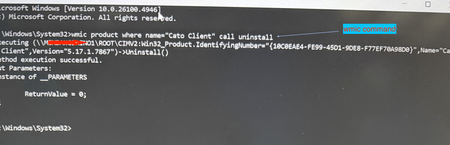
Use case: Although manual uninstall may not be required frequently, there may be instance where you have a user with corrupt installation and you must uninstall remotely. Another typical use case I cam across recently - your company self service portal (e.g. Intune or Kandji) has a different version than what is installed on the user device and now you want to downgrade the client. In order to downgrade you will need to uninstall the existing installation first. You can do this using a simple command. Prerequisite: Admin privilege on the system How To? Launch command prompt using privileged mode (i.e. run as "admin") and then issue following command [screenshot example on Windows 11 attached] or simply execute this command remotely on the system running SDP client: \Windows\System32\wmic product where name=“Cato Client" call uninstall Corrupt installation that persists after boot? From time to time support may advise doing a clean install. Here is what you would do for a more elaborate clean removal of the SDP client for reinstall- Uninstall CATO Client by following the Article How To Uninstall the Windows Client, when uninstalling the CATO Client, kindly delete the cache contents located at "C:\Users\User\AppData\Local\CatoNetworks\Cache" Go to Control Panel > Network and Internet -> Network Connections Ensure that all CATO Adapters and Local Area Connection adapter ( WinTun Userspace Adater) have been removed, if they still exist, manually delete them (disabling them alone will not help).594Views1like0Comments