Pre-Login and Online Services
We currently have an on-premises Active Directory and have Pre-Login enabled with connect at boot enabled. We defined internal destinations (domain domain controllers) as allowed destinations, so the devices can reach the domain controllers before the user has logged in. This worked fine so far. However, now we want to migrate to Entra ID and Intune only, which means that the machines now need to reach Entra and Intune before or directly after the login. Since the pre login mode doesn't allow them to reach all URLs of Entra ID and Intune, we get problems during log in and for the Intune enrollement (which happens after the login of a new user but before the user has authenticated with the CATO client). We also have the same problem with NinjaOne which we use to manage endpoints: We would like to be able to reach endpoints before a user has logged in. In the allowed destinations for the Pre login mode, I can only provide internal targets and IPs, but can't put any Internet hostnames so the devices can reach Entra ID and Intune before the user has authenticated. So what is the solution here? We want to use Pre login to have the security it provides and prevents the devices from having open Internet access before the user has authenticated with CATO, but really need to resolve these issues that are caused by it when it comes to connect to our management services before the user has authenticated. Thank you in advance.253Views2likes7Comments
Windows CA with Cato for Device Posture Check
I’m looking for guidance on configuring a Windows CA to issue and validate RSA certificates for device posture verification in Cato. Has anyone implemented this integration?What’s the best approach for certificate management? Should we use self-signed certificates or purchase individual device certificates from DigiCert or another vendor? If anyone has implemented this, please share the pros and cons.207Views0likes2Comments
Is there a way to restrict access to the WebUI?
Hi all, Some of our customers want to restrict access to the Web UI from the local networks of the socket. However, even though I write LAN FW rules, the local IPs will respond to the HTTPs request from every network on the LAN port, even if that is a guest network. Is there any way to restrict access to the WebUI? If not, isn't such a configuration necessary? Thank you,Solved167Views1like4CommentsCato CMA Presets: How to edit?
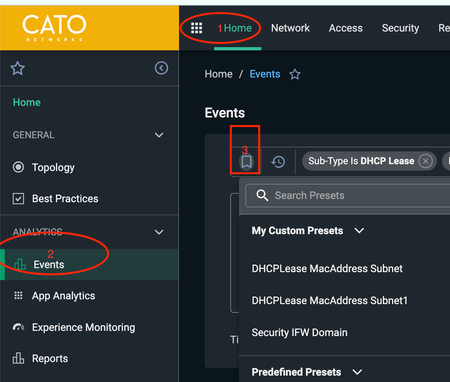
Imagine nightmare of memorizing your frequently used Event Types and Sub-Type fields to find the results you are looking for! Cato CMA Preset is synonymous to your saved event query on other management platforms. A very powerful quick action feature that let's you jump directly to your favorite queries showing instant results. How handy when you are in the midst of troubleshooting a P1 issue! There are a few predefined presets (refer to first screenshot towards bottom you will notice them). You can also create your own custom presets (follow the instructions below and the screenshot). You can delete an already created preset or save that as your default preset to run next when you launch your event dashboard each time. How do I edit my saved preset or create a new one? While you cannot edit an existing preset, you can make changes and save using an existing preset. Once you run a preset, modify the arguments you would like and save it as a new preset. Follow the steps below: Go to the Home > Events page Create a custom preset: Set your desired event filters and time frame for your query Click on bookmark icon with plus sign on the far right of the search bar Enter a Name for the preset in the Custom Preset panel Click Apply The preset will be added to the Custom Presets drop-down menu Using an existing presets: Click the Select Presets drop-down menu in the filter bar Choose from predefined event filters for common scenarios or your saved custom presets The filters will automatically be applied and the page will update to show matching events Modify the search Click on bookmark icon with plus sign on the far right of the search bar (refer to the second screenshot) Enter a Name for the preset in the Custom Preset panel Click Apply The preset will be added to the Custom Presets drop-down menu Refer to this article for more information: https://support.catonetworks.com/hc/en-us/articles/4413273461905-Analyzing-Events-in-Your-Network108Views1like2CommentsSetting up custom email alerts for changes in CMA
We would like to see email alerts when either of the following changes are made in the Cato Management App Firewall policies are added/modified Routing changes are made. changes are made to the TLS inspection policy Any other changes that could affect the security profile How can we setup such email alerts204Views2likes7Comments