Is there any way to expose/export DHCP logs from Cato SDP clients?
is there any way (events / API) to see DHCP events for our SDP users? Our security vendors (Rapid7 and Defender for Identity) are doing correlation based on DNS and DHCP events and sometimes see SDP addresses as different machines. I have DNS and PTR records updating but am curious if there is any way to expose the DHCP lease events for SDP users. I see those events for other Cato DHCP but not for SDP users in my tenant. Cato has the concept of "User Awareness" that is correlating IP addresses to User IDs. When we were using Windows DHCP servers we fed the logs to our security vendors for a similar type of correlation between IP addresses and User IDs. As we are moving away from Windows Servers in our offices, we are losing this visibility. We are beginning to allow Cato to provide the DHCP on our LAN segments, as well as for our remote SDP client users. As this happens, we are seeing DHCP events on the LAN segments which can be tied to machine names and matched against login events via active directory or Entra ID to correlate IP addresses to users. However, for our remote SDP client users I cannot seem to find DHCP events. This leads to issues. Microsoft Defender for Endpoint sees a user getting different IP remote SDP client addresses in the 10.41.x.x as "Pass the Hash" attacks. However, when I investigate, it is the same workstation being getting different IP addresses through normal, remote operation. If the user does not reboot/login every day this raises security alerts. Am I missing the point, or not configuring something correctly? Is there a way via API or syslog forwarding to monitor DHCP logs from Cato for both LAN segments and SDP client segments? The ultimate solution would be log forwarding type of solution where I could forward all Cato DHCP lease events to Microsoft Defender for Endpoints/Identity and my security vendor (Rapid7) but I am just wondering how others are handling this. I figured I would ask around before I put something in the Idea hub for a non-issue.38Views0likes2Comments
Pre-Login and Online Services
We currently have an on-premises Active Directory and have Pre-Login enabled with connect at boot enabled. We defined internal destinations (domain domain controllers) as allowed destinations, so the devices can reach the domain controllers before the user has logged in. This worked fine so far. However, now we want to migrate to Entra ID and Intune only, which means that the machines now need to reach Entra and Intune before or directly after the login. Since the pre login mode doesn't allow them to reach all URLs of Entra ID and Intune, we get problems during log in and for the Intune enrollement (which happens after the login of a new user but before the user has authenticated with the CATO client). We also have the same problem with NinjaOne which we use to manage endpoints: We would like to be able to reach endpoints before a user has logged in. In the allowed destinations for the Pre login mode, I can only provide internal targets and IPs, but can't put any Internet hostnames so the devices can reach Entra ID and Intune before the user has authenticated. So what is the solution here? We want to use Pre login to have the security it provides and prevents the devices from having open Internet access before the user has authenticated with CATO, but really need to resolve these issues that are caused by it when it comes to connect to our management services before the user has authenticated. Thank you in advance.214Views2likes7Comments
Relocate of Old Socket to new location
Hi Cato Community Has anyone previously attempted to relocate an old socket to a new site or location? We are looking for the best method to move the existing socket without impacting its current configuration. In addition to relocating the old socket, we will also be deploying a new socket at the new site—resulting in two sockets operating in the new location. Any guidance or recommendations based on your experience would be greatly appreciated.Solved54Views0likes3Comments
CATO Socket port flapping with certain Spectrum modems
Hi everyone, We would like to raise awareness of a recent issue, where the CATO Socket port may begin flapping when connected to specific Spectrum-provided modems. While the root cause appears to be related to these modems and cannot be addressed on our side, replacing the modem is consistently proven to be an effective solution. If you experience CATO socket port flapping and you are using Spectrum-provided modems. To resolve this issue, add a Switch in between the CATO Socket and the Spectrum modem. If the does not help, you can contact Spectrum support and requested a replacement modem, specifying that you need a different model due to compatibility issues. Ask for either the Hitron ET2251 or EU2251, as both of these seems to have resolve this issue in real customer scenarios.91Views0likes1Comment
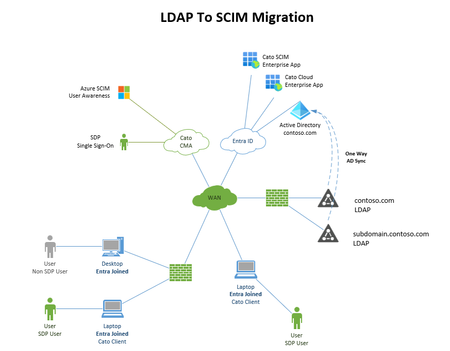
LDAP To SCIM Migration
We are planning to migrate from Cato Directory Services LDAP & User Awareness to Cato SCIM user provisioning and looking to get some feedback if anyone has performed this migration and if they encountered any issues during the migrations. We currently have a few domains, over 3500 users and not everyone has an SDP lic, a mixture of Entra joined and non-Entra joined devices. SSO for VPN Users. I'm trying to understand how users are going to be mapped to the workstations they are logging in from and identified since Cato currently taps into DC's Event viewer to map users to computers and LAN IP's. We have Shared computers where an SDP license is not needed as these are fixed computers. We see the user login events, but not the details for the system they are logging in from and LAN IP. Will there be problems if we migrate 1 domain first and wait a week or two to iron out any bugs? Should Always-On Windows RegKey be removed from all systems prior the migration?158Views0likes3Comments
Visit website with error(HTTP Version Not Supported) with Cato
HTTP Version Not Supported Your client is using HTTP version 1.1, which is not supported. This service requires HTTP/2. Please update your client or contact support Reply from Cato Support : I have confirmed internally that HTTP/2 is not supported yet.153Views0likes2CommentsEndpoint Device DNS Resolution
When Cato is handling DHCP and DNS for all devices within an account across multiple vlans, across multiple sites, is it possible for a device to resolve the IP of a hostname outside of the local subnet that the device is on, using Cato DNS to resolve the hostname? We historically have had on-prem Windows AD providing DHCP/DNS which reliably provided name resolution from hostname to IP, but also reverse DNS for IP back to hostname. We are moving to Entra ID/Intune+Auto Pilot managed devices with the outlook to retire our on-prem servers entirely. We have various use cases where we need to resolve a hostname to have the IP returned, but also for the IP to resolve back to hostname via reverse DNS. This has become difficult for Entra ID managed devices unless the device is on the same local subnet where the site switch manages the resolution via the local mac table. Is mDNS the right approach and where I should focus my attention or is there an alternative I should consider? As is looks like mDNS is restricted to vlans within the same site, it may not work in our scenario where we need to resolve across sites. Any advice or recommendations are greatly appreciated.186Views2likes5Comments
Identifying the Cause of LDAP Synchronization Failure
Hello, We have been synchronizing accounts with an on-premises LDAP server. The synchronization worked normally until July 2nd, but it stopped working from July 3rd. We want to identify the cause, but it is difficult to investigate because the source IP shown in the web UI is different. Does anyone have any ideas on how to perform something like a traceroute from the source IP used for LDAP synchronization? Thank you for your assistance.96Views0likes3Comments