URL - Category over-ride not taking effect?
Is your URL category over-ride not taking effect? When configuring firewall rules by domain you do not need to specify the subdomains. Firewall rules will even cover the subdomains if you specify a Top Level Domain e.g. "uk" would cover all the subdomains such as bbc.co.uk). This is not the case when using domains to override a category though! Category over-ride from CMA for an domain / FQDN applies just to the that domain or FQDN. Any subdomains must be specified with its own FQDN. E.g. over-riding category for http://catonetworks.com to a category of your choice does not change the category for http://www.catonetworks.com Hope you find this helpful. Thanks Nath based on your comment I have added following article that shows how to add a custom app to get around having to override individual domains. Add the custom app in a rule and place it above the rule that blocks the traffic. https://support.catonetworks.com/hc/en-us/articles/4413265662993-Working-with-Custom-Apps Reference Article: https://connect.catonetworks.com/kb/cato-cloud-best-practices/how-to-block-a-tld-top-level-domain-or-a-specific-country/374227Views3likes2CommentsHow to Uninstall Windows Cato SDP Client Remotely?
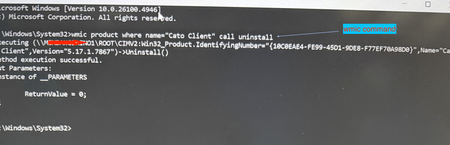
Use case: Although manual uninstall may not be required frequently, there may be instance where you have a user with corrupt installation and you must uninstall remotely. Another typical use case I cam across recently - your company self service portal (e.g. Intune or Kandji) has a different version than what is installed on the user device and now you want to downgrade the client. In order to downgrade you will need to uninstall the existing installation first. You can do this using a simple command. Prerequisite: Admin privilege on the system How To? Launch command prompt using privileged mode (i.e. run as "admin") and then issue following command [screenshot example on Windows 11 attached] or simply execute this command remotely on the system running SDP client: \Windows\System32\wmic product where name=“Cato Client" call uninstall Corrupt installation that persists after boot? From time to time support may advise doing a clean install. Here is what you would do for a more elaborate clean removal of the SDP client for reinstall- Uninstall CATO Client by following the Article How To Uninstall the Windows Client, when uninstalling the CATO Client, kindly delete the cache contents located at "C:\Users\User\AppData\Local\CatoNetworks\Cache" Go to Control Panel > Network and Internet -> Network Connections Ensure that all CATO Adapters and Local Area Connection adapter ( WinTun Userspace Adater) have been removed, if they still exist, manually delete them (disabling them alone will not help).530Views1like0Comments