Pre-Login and Online Services
We currently have an on-premises Active Directory and have Pre-Login enabled with connect at boot enabled. We defined internal destinations (domain domain controllers) as allowed destinations, so the devices can reach the domain controllers before the user has logged in. This worked fine so far. However, now we want to migrate to Entra ID and Intune only, which means that the machines now need to reach Entra and Intune before or directly after the login. Since the pre login mode doesn't allow them to reach all URLs of Entra ID and Intune, we get problems during log in and for the Intune enrollement (which happens after the login of a new user but before the user has authenticated with the CATO client). We also have the same problem with NinjaOne which we use to manage endpoints: We would like to be able to reach endpoints before a user has logged in. In the allowed destinations for the Pre login mode, I can only provide internal targets and IPs, but can't put any Internet hostnames so the devices can reach Entra ID and Intune before the user has authenticated. So what is the solution here? We want to use Pre login to have the security it provides and prevents the devices from having open Internet access before the user has authenticated with CATO, but really need to resolve these issues that are caused by it when it comes to connect to our management services before the user has authenticated. Thank you in advance.214Views2likes7CommentsHow to Uninstall Windows Cato SDP Client Remotely?
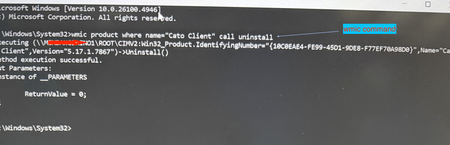
Use case: Although manual uninstall may not be required frequently, there may be instance where you have a user with corrupt installation and you must uninstall remotely. Another typical use case I cam across recently - your company self service portal (e.g. Intune or Kandji) has a different version than what is installed on the user device and now you want to downgrade the client. In order to downgrade you will need to uninstall the existing installation first. You can do this using a simple command. Prerequisite: Admin privilege on the system How To? Launch command prompt using privileged mode (i.e. run as "admin") and then issue following command [screenshot example on Windows 11 attached] or simply execute this command remotely on the system running SDP client: \Windows\System32\wmic product where name=“Cato Client" call uninstall Corrupt installation that persists after boot? From time to time support may advise doing a clean install. Here is what you would do for a more elaborate clean removal of the SDP client for reinstall- Uninstall CATO Client by following the Article How To Uninstall the Windows Client, when uninstalling the CATO Client, kindly delete the cache contents located at "C:\Users\User\AppData\Local\CatoNetworks\Cache" Go to Control Panel > Network and Internet -> Network Connections Ensure that all CATO Adapters and Local Area Connection adapter ( WinTun Userspace Adater) have been removed, if they still exist, manually delete them (disabling them alone will not help).580Views1like0Comments
Windows Cato Client Throughput Throttled by 3rd-Party Software
Hi everyone, We would like to raise awareness of a recent issue we've seen quite often in Cato support: 3rd-party software, such as the Intel Connectivity Performance Suite and Dell Optimizer, throttles network throughput while the Cato Client for Windows is connected, often by 50% or more compared to when the Cato Client is disconnected. These programs are designed to prioritize different types of traffic, but they aren't optimized for use with the Cato Client. While we work with these vendors to resolve these issues, we recommend uninstalling these software programs to achieve maximum throughput and performance when using the Cato Client. We recently added a step in our Cato SDP Client Performance Troubleshooting KB to check for these programs and provided links to the vendors' uninstall instructions. If you know of any other 3rd-party software that interferes with Cato Client performance, please feel free to comment and share with others here or open a support ticket so we can investigate further. Thank you!182Views1like1Comment