Cato SDP Client to be auto intelligent to login instead of manual logging
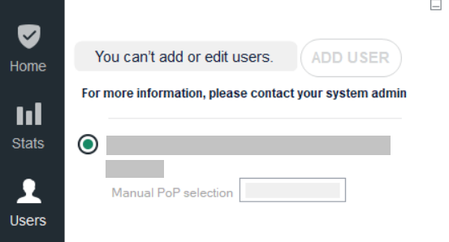
I have recently migrated from Netskope to Cato Networks. One issue we have noticed is that users need to login once to Cato SDP client and then "Always-on policy" gets enabled. But users are smart, they don't login to SDP client itself as many sites gets blocked as per policy which they don't want so they don't login once also to SDP client thus making us non-compliant as absence of SDP client makes them vulnerable as they can browse malicious sites as well as can upload company data on public sites which typically gets blocked when connected over SDP client. In Netskope, we just had to push agents to the laptop and no user intervention was required, it automatically detects logged in user credentials so there was no scope for user to not login or bypass security controls. Can't we make zero touch experience for user so that there is no room for escape or delay as now we are totally dependent on user.817Views0likes17CommentsHow to Uninstall Windows Cato SDP Client Remotely?
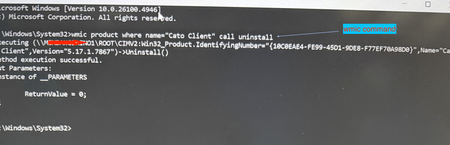
Use case: Although manual uninstall may not be required frequently, there may be instance where you have a user with corrupt installation and you must uninstall remotely. Another typical use case I cam across recently - your company self service portal (e.g. Intune or Kandji) has a different version than what is installed on the user device and now you want to downgrade the client. In order to downgrade you will need to uninstall the existing installation first. You can do this using a simple command. Prerequisite: Admin privilege on the system How To? Launch command prompt using privileged mode (i.e. run as "admin") and then issue following command [screenshot example on Windows 11 attached] or simply execute this command remotely on the system running SDP client: \Windows\System32\wmic product where name=“Cato Client" call uninstall Corrupt installation that persists after boot? From time to time support may advise doing a clean install. Here is what you would do for a more elaborate clean removal of the SDP client for reinstall- Uninstall CATO Client by following the Article How To Uninstall the Windows Client, when uninstalling the CATO Client, kindly delete the cache contents located at "C:\Users\User\AppData\Local\CatoNetworks\Cache" Go to Control Panel > Network and Internet -> Network Connections Ensure that all CATO Adapters and Local Area Connection adapter ( WinTun Userspace Adater) have been removed, if they still exist, manually delete them (disabling them alone will not help).563Views1like0Comments
"400 Bad Request" Error Occurs with Okta SSO - Unable to Log in to VPN
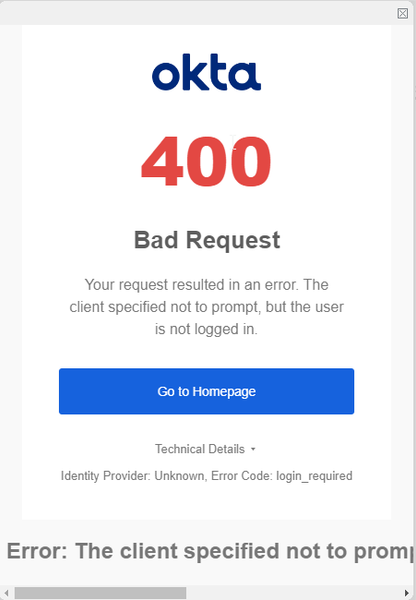
I configured SSO authentication with Okta as the IdP for the Cato VPN Client, but when attempting to connect to the VPN, I receive a '400 Bad Request' error and cannot log in. Setup: "Single Sign-On" has been configured in CMA "Cato Portal" configured in Okta A VPN connection has been attempted using the Cato Client During authentication, the following error message appears: Error Message: "400 Bad Request" What I have tried: I found the following information in Okta's Knowledge Base, but I was unable to locate the corresponding setting in the Cato Portal Make sure that the redirect_uri, http://localhost:8080/authorization-code/callback is registered as an allowed Sign-in redirect URI in Open ID Client for the application being used [Reference link] (https://support.okta.com/help/s/article/The-redirect-uri-parameter-must-be-an-absolute-URI?language=en_US) Question: If anyone has encountered and resolved this issue, I would appreciate any insights on key configuration points or possible solutions. Additional Information: I am using Okta's free Developer edition (https://developer.okta.com/login/) for testing.275Views0likes7Comments
Pre-Login and Online Services
We currently have an on-premises Active Directory and have Pre-Login enabled with connect at boot enabled. We defined internal destinations (domain domain controllers) as allowed destinations, so the devices can reach the domain controllers before the user has logged in. This worked fine so far. However, now we want to migrate to Entra ID and Intune only, which means that the machines now need to reach Entra and Intune before or directly after the login. Since the pre login mode doesn't allow them to reach all URLs of Entra ID and Intune, we get problems during log in and for the Intune enrollement (which happens after the login of a new user but before the user has authenticated with the CATO client). We also have the same problem with NinjaOne which we use to manage endpoints: We would like to be able to reach endpoints before a user has logged in. In the allowed destinations for the Pre login mode, I can only provide internal targets and IPs, but can't put any Internet hostnames so the devices can reach Entra ID and Intune before the user has authenticated. So what is the solution here? We want to use Pre login to have the security it provides and prevents the devices from having open Internet access before the user has authenticated with CATO, but really need to resolve these issues that are caused by it when it comes to connect to our management services before the user has authenticated. Thank you in advance.201Views2likes7Comments
Windows Cato Client Throughput Throttled by 3rd-Party Software
Hi everyone, We would like to raise awareness of a recent issue we've seen quite often in Cato support: 3rd-party software, such as the Intel Connectivity Performance Suite and Dell Optimizer, throttles network throughput while the Cato Client for Windows is connected, often by 50% or more compared to when the Cato Client is disconnected. These programs are designed to prioritize different types of traffic, but they aren't optimized for use with the Cato Client. While we work with these vendors to resolve these issues, we recommend uninstalling these software programs to achieve maximum throughput and performance when using the Cato Client. We recently added a step in our Cato SDP Client Performance Troubleshooting KB to check for these programs and provided links to the vendors' uninstall instructions. If you know of any other 3rd-party software that interferes with Cato Client performance, please feel free to comment and share with others here or open a support ticket so we can investigate further. Thank you!175Views1like1Comment
"Record Issue" button - what is it for?
The Cato Windows client has included a "Record Issue" button for a long time - but is it actually of any practical use? Whenever I have submitted a support ticket I am never asked to make use of this, but rather been asked to perform a SSS (which is not at all very convenient, especially when attempting to explain to a remote end user how to perform those steps). I now see that the addition of such a button is touted as a major new feature for the macOS Client v5.8 - does this mean that it might actually have become usable for the Windows client as well?169Views0likes4Comments
LDAP To SCIM Migration
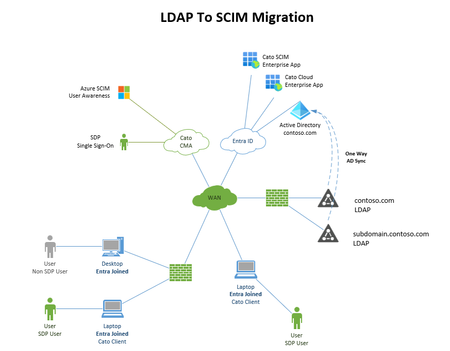
We are planning to migrate from Cato Directory Services LDAP & User Awareness to Cato SCIM user provisioning and looking to get some feedback if anyone has performed this migration and if they encountered any issues during the migrations. We currently have a few domains, over 3500 users and not everyone has an SDP lic, a mixture of Entra joined and non-Entra joined devices. SSO for VPN Users. I'm trying to understand how users are going to be mapped to the workstations they are logging in from and identified since Cato currently taps into DC's Event viewer to map users to computers and LAN IP's. We have Shared computers where an SDP license is not needed as these are fixed computers. We see the user login events, but not the details for the system they are logging in from and LAN IP. Will there be problems if we migrate 1 domain first and wait a week or two to iron out any bugs? Should Always-On Windows RegKey be removed from all systems prior the migration?153Views0likes3Comments